And it´s a bear! D:
Hi there folks : )! I´m Drerhu, Randt´s perennial partner and part of the Pixelepsy Games crew. I hope you all find this place interesting, Randt has put a lot of work in it ^^
I´m kinda busy right now : \ but at the next weeks I´ll try to post some updates of our efforts on the gamemaking world.
And just for you, a link to the amazing Indiegames.com website with interesting tools for making games : )
http://indiegames.com/cgi-bin/mt5/mt-search.cgi?blog_id=14&tag=tool&limit=20
Stay tuned, and thx for coming ^^!
Thursday, 31 January 2013
Tuesday, 29 January 2013
[WME] Randt vs Wintermute
Finally, I tried to learn to use Wintermute because I read WME is more powerful than AGS. But, although I put WME in Spanish and I was reading the manual, my face was some like...
Then, I garthered my courage and patient...
...and I continued trying it...
...but...
...and I felt like...
And finally... zzZZZz
So I dismissed WME by now.
Maybe, I'll try it in a future... when I will be tired with AGS and GM ^^'.
Sunday, 27 January 2013
Brooklyn Bridge
I wasn't death *teehee*, I was only working in this background and besides I'm having a lot of problems with Game Maker and the game story x.x"
Well, almost here I have: my first bacground in pixel art~ ☆‿☆*
It's New York, in fact, Brooklyn bridge.
Wednesday, 23 January 2013
[GM] Scale Script
This morning I created a "scale script". It'll allow me scale sprites automatically in each room without long codes (as I had put before). This script have to be put in a step event, obviously.
In my case, the "street 1 room", the script is the next one:
Tuesday, 22 January 2013
[GM] AI and depth problems fixed~

Well, I couldn't resolve why the alarm doesn't work so I tried other solution... but it didn't work too. I wanted throw the pc out the window but then my dear daddy reminded me I used an "create even" instead of "step event"... so basic problem! *sigh*
The new AI code are:
- Create even:
- The piece of code:
- Alarm 0: set horizontal speed = -walk_speed.
- Step Event:
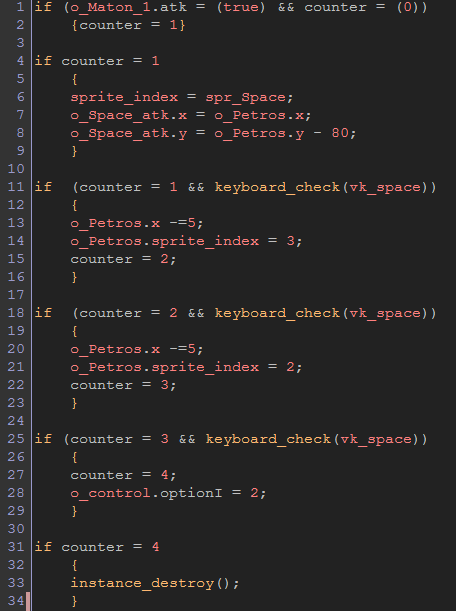
I add a "space button". The button appear when Petros is under attack and if you press "space", the battle'll end. The code is:
- Create Event: a piece of code: counter = 0.
- Step Even:
On the other hand, the depth problems was truly easy to solved:
But to programme in GM is like watch Lost TV serie... I resolve a problem and then I have two new problems *sigh* OTL Now, my problem is "Space button" doesn't work correctly because counter = 1 go to counter = 4 directly and I don't understand why ;__;.
Monday, 21 January 2013
Petros' sprites
Finally, I finished Petros' basic sprites. Altought I need some more sprites for the Petros at Law's "first level": some more complex movements, two enemies and their atacks T.T *sob sob*.
[GM] My first AI
I'm happy and proud because I did my first AI ★‿★! and I did it without help~ (for now...U teehee).
However, I have problems with the easiest function, lol.
GMZ file: http://rghost.net/43213252
I have basically two problems:
However, I have problems with the easiest function, lol.
GMZ file: http://rghost.net/43213252
I have basically two problems:
- I tried to script a "automatic depth" (according to "y edge") but objets superimpose badly yet :S
- I need two men follow to player, atack him and, when his life was 0, leave the room. I got "follow" and "atack" actions but I didn't get to "reduce life to 0" :S And sometimes (mainly when I put only a man on the room), men do odd movements and try "run away" (I programmed a coward AI, lol).
Subscribe to:
Comments (Atom)